 IP
IP Icon / Image Meaning Table
The address 20.167.168.95 is a public IP, which serves as a unique identifier for a device or network on the internet. Our geolocation data indicates that this IP address is located in Canberra, Australian Capital Territory, Australia. The image above offers a quick summary, with a more detailed explanation provided below.
| IP Address: | 20.167.168.95 |
| Continent ? : | Oceania |
| Country Code ? : | AU ? |
| Country ? : | Australia 🇦🇺 ? |
| Region ? : | Australian Capital Territory |
| City ? : | Canberra |
| Latitude ? : | -35.3065 |
| Longitude ? : | 149.1266 |
20.167.168.95 Content:
- 1. What is 20.167.168.95?
- 2. Is 20.167.168.95 a Public or Private IP Address?
- 3. Which Country Is 20.167.168.95 Located In?
- 4. Which City Is 20.167.168.95 Located In?
- 5. Can I Find the Exact Location of 20.167.168.95?
- 6. Who Is the Internet Service Provider for 20.167.168.95?
- 7. What Is the Reverse DNS of 20.167.168.95?
- 8. Is 20.167.168.95 a Proxy IP Address?
- 9. What Is the Network Speed of 20.167.168.95?
- 10. What Is 20.167.168.95 Used For?
- 11. How Can I Find the Administrator of 20.167.168.95?
- 12. Where Does the Information About 20.167.168.95 Come From?
1. What is 20.167.168.95?
An IP address, like 20.167.168.95, is a unique identifier for a device on the internet. Think of it as a digital street address that allows devices to send and receive information over a network.
Technically, an IP address is a string of numbers that can be represented in different formats like binary or hexadecimal. However, the most common format you will see is dot-decimal notation, as shown below.
 Description of IP Address in Binary, Decimal and Hexadecimal
Description of IP Address Class A/B/C/D/E and Network ID, Host ID
Description of IP Address in Binary, Decimal and Hexadecimal
Description of IP Address Class A/B/C/D/E and Network ID, Host ID
How to Read an IP Address
- Four-Part Structure: A standard IPv4 address is always made up of four numbers separated by dots (periods). Addresses with fewer or more than four parts, like 20.167.168 or 20.167.168.95.1, are invalid.
- Number Range (0-255): Each of the four numbers must be between 0 and 255. An address containing a number larger than 255, such as 20.167.168.256, is invalid.
- Standard Separator: While you might occasionally see spaces or hyphens used (e.g., 20-167-168-95 or 20 167 168 95), the official and correct separator is a dot, as in 20.167.168.95.
To learn more about how IP addresses work, check out our full guide: What Is an IP Address?
2. Is 20.167.168.95 a Public or Private IP Address?
The address 20.167.168.95 is a public IP address. This means it is directly accessible from the global internet, allowing other devices online to connect to the network or service it represents.
To understand this better, it helps to know the three main types of IP addresses:
- Public IP Addresses: These are unique addresses used on the public internet, assigned by official registries to organizations like Internet Service Providers (ISPs).
- Private IP Addresses: These are specific ranges set aside for use within a local, private network (like your home or office). They cannot be reached directly from the internet.
- Reserved IP Addresses: This is a category for addresses set aside for special technical purposes (e.g., network testing) and are not for general use.
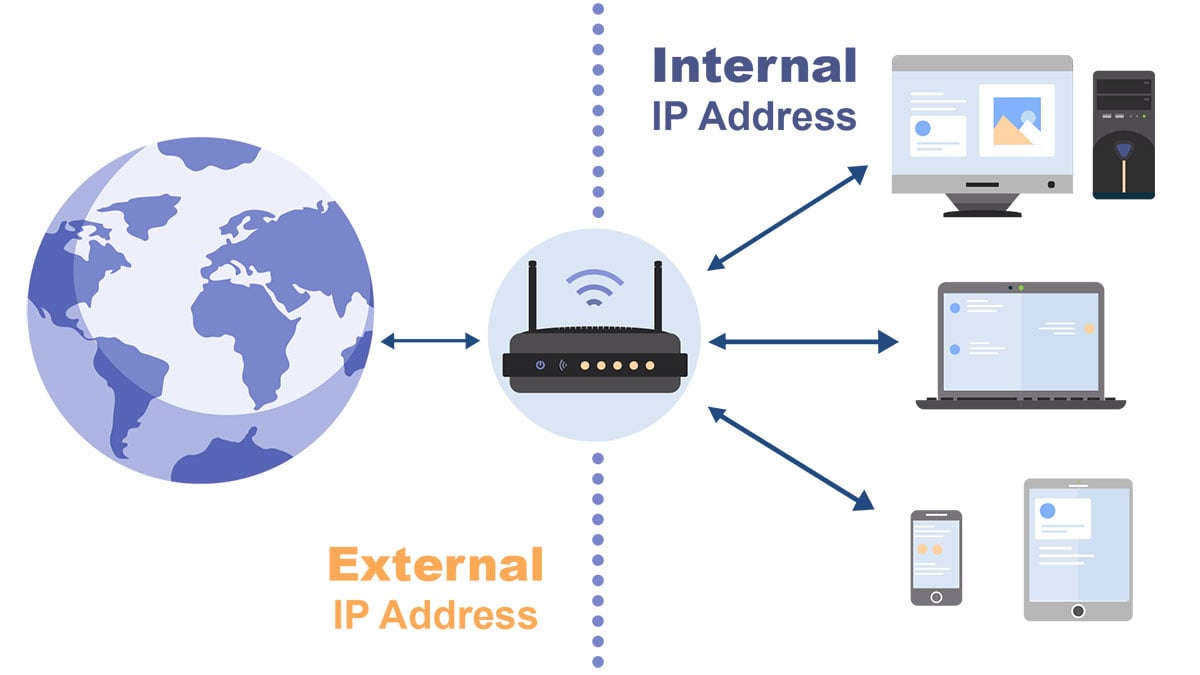
The image above illustrates the general difference between how public and private IPs are used.
Important Notes About IP Addresses
- IPs Can Change: Public IP addresses are often dynamic, meaning your ISP may assign you a new one periodically. The device using a specific public IP can also change.
- Enhancing Security with Private IPs: For better security, devices are often placed on a private network behind a router. The router uses its single public IP to communicate with the internet, acting as a protective barrier. This process is called Network Address Translation (NAT).
- IPv4 Scarcity: Because there is a limited number of IPv4 addresses, most homes and offices use private IPs for individual devices (phones, computers, etc.). The router is typically the only device on the network with a direct public IP address.
More Articles
Understanding Public, Private, and Reserved IP Address Types
3. Which Country Is 20.167.168.95 Located In?
In summary, the IP address 20.167.168.95 is located in Australia.
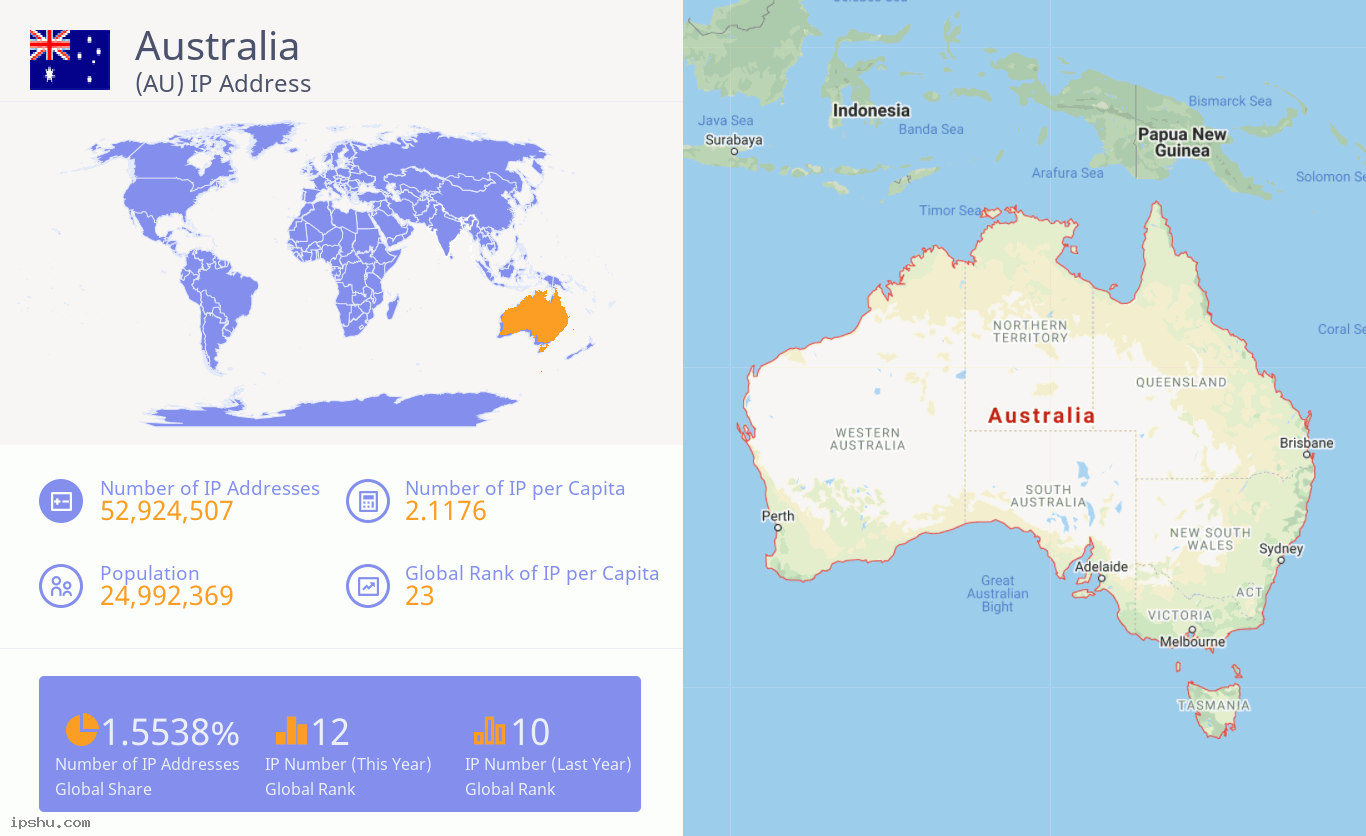
This location is determined through a global IP allocation system. At the top, the Internet Assigned Numbers Authority (IANA) coordinates and allocates large blocks of IP addresses to five Regional Internet Registries (RIRs).
- ARIN (American Registry for Internet Numbers): Serves Canada, the United States, and some Caribbean islands.
- APNIC (Asia-Pacific Network Information Centre): Serves the Asia-Pacific region.
- RIPE NCC (Réseaux IP Européens Network Coordination Centre): Serves Europe, the Middle East, and Central Asia.
- LACNIC (Latin America and Caribbean Network Information Centre): Serves Latin America and some Caribbean islands.
- AFRINIC (African Network Information Centre): Serves the African region.
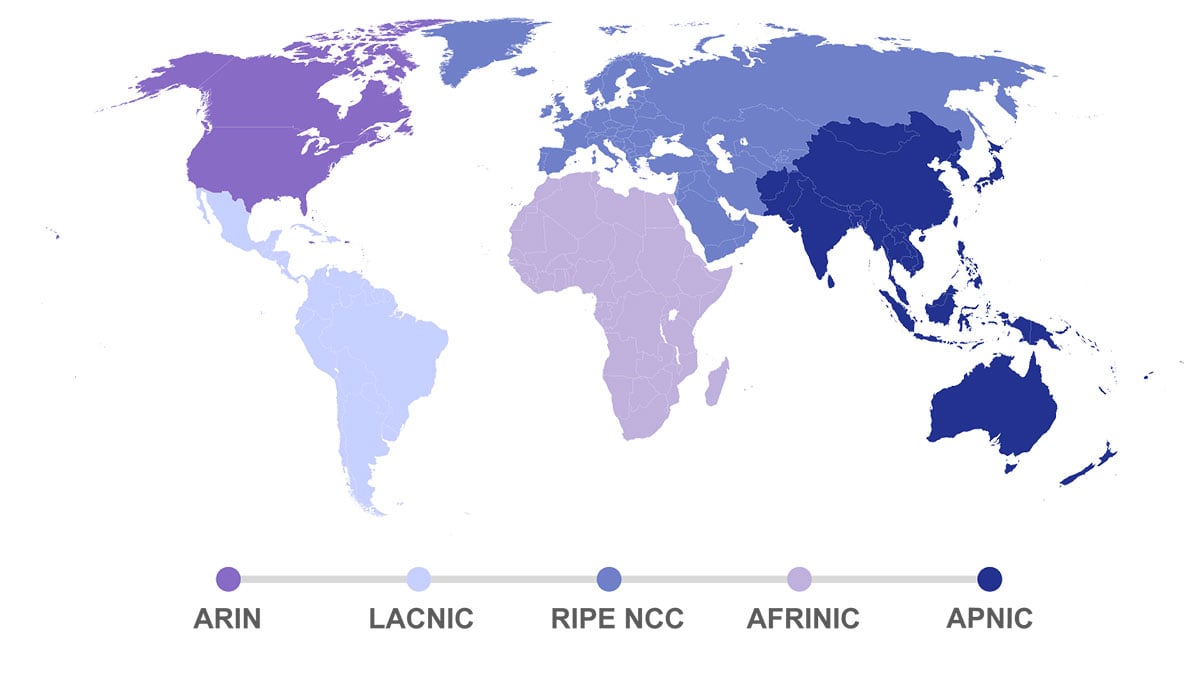
These RIRs then assign smaller IP blocks to organizations like Internet Service Providers (ISPs) and large companies within their geographic regions. When an organization is assigned an IP block, that block is typically registered to the country where the organization is based. We determine an IP's location by looking up this public registration data.
Accuracy and Exceptions
While this system is generally accurate, there are exceptions. For example, a multinational company might use an IP block registered in one country for its services in another. Similarly, the location of an IP address used by a VPN or proxy will reflect the server's location, not the user's.
We use a combination of data sources and technical methods to provide the most precise location possible. Our results are accurate in over 99.9% of cases, but please note that rare inaccuracies can still occur.
More Articles
4. Which City Is 20.167.168.95 Located In?
In summary, the IP address 20.167.168.95 is located in Canberra, Australian Capital Territory, Australia.
- City Longitude: 149.12655639648°
- City Latitude: -35.306541442871°
Please note: The location data and coordinates above refer to the city of Canberra, not the exact physical location of the user or their device.
We determine an IP's city-level location by cross-referencing information from multiple data sources and using various technical methods.

A Note on Accuracy:
Due to the way IP addresses are allocated and change over time, even the best services in the industry rarely achieve city-level accuracy of more than 80%. Any website or business claiming 95% accuracy or higher is likely not credible.
Of course, this 80% average doesn't mean the accuracy for 20.167.168.95 is exactly 80%; it could be more or less accurate. To verify the result, you can compare information from several lookup websites and use tools like network speed tests, which also indicate a server's location.
More Articles
5. Can I Find the Exact Location of 20.167.168.95?
The simple answer is: no, you generally cannot find a user's exact physical address from their IP address.
While we can often identify the city (Canberra, Australian Capital Territory, Australia) associated with the IP 20.167.168.95, getting a precise location like a specific street or house number is practically impossible for the public.

One major reason is that many Internet Service Providers (ISPs) use dynamic IP addresses. This means an IP address is temporarily assigned to a user when they connect to the internet. When they disconnect, that same IP can be reassigned to a different user, making it impossible to link a public IP to a single, permanent location over time.
The only entity that can trace a dynamic IP address back to a specific individual is the ISP. ISPs keep internal logs of which customer was assigned which IP address at any given time. However, for privacy reasons, they will only disclose this information to law enforcement with an official legal request.
The map below shows the approximate location for your public IP address 20.167.168.95:
Location: Canberra, Australian Capital Territory, Australia
Coordinates: -35.306541442871°, 149.12655639648°
Disclaimer: This location data points to the city level and does not represent the user's exact address. The information is provided for reference only and its accuracy is not guaranteed.
More Articles:
6. Who Is the Internet Service Provider for 20.167.168.95?
The Internet Service Provider (ISP) for the IP address 20.167.168.95 is Microsoft Corporation.

This means that Microsoft Corporation requested a block of IP addresses from a Regional Internet Registry (RIR) and has currently assigned 20.167.168.95 to a customer's internet connection in Canberra, Australian Capital Territory, Australia.
For more information, you can browse our lists of ISPs by country:
7. What Is the Reverse DNS of 20.167.168.95?
What Is a Reverse DNS Lookup?
The Domain Name System (DNS) acts like the internet's address book. Typically, you use a forward DNS lookup to find an IP address from a domain name (like looking up a person's address by their name).
A reverse DNS lookup does the opposite: it finds the hostname associated with a specific IP address (like finding a person's name by their address). This is a more specialized tool used to verify the identity of a server.
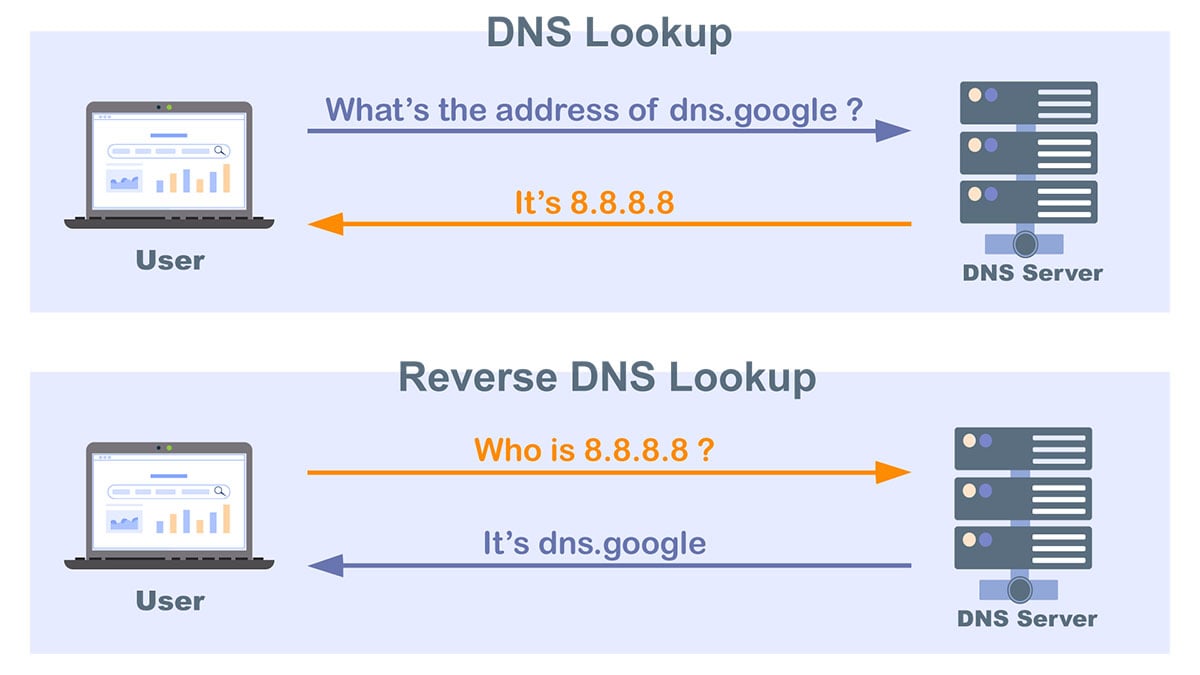
On a Linux system, you can perform a reverse DNS lookup using the host 20.167.168.95 command.
- If no reverse DNS record is set up for 20.167.168.95, the command will often return the IP address itself. For example, a lookup for 52.173.80.234 returns 52.173.80.234.
- If a reverse DNS record exists, the command will return the associated hostname. For example, a lookup for 66.249.64.145 returns crawl-66-249-64-145.googlebot.com.
Please Note: A reverse DNS lookup requires an active internet connection. Sometimes, due to network congestion or temporary server issues, a lookup might time out and incorrectly return the IP address itself, even if a record exists. If you suspect this is happening, you can try running the host 20.167.168.95 command a few more times or try again later.
More Articles
8. Is 20.167.168.95 a Proxy IP Address?
By querying various databases, we can determine if the IP address 20.167.168.95 is a known proxy server and identify its type.
20.167.168.95 is not a proxy IP Address.
Normally, when your device connects to a website, it does so directly. A proxy server acts as an intermediary or "middleman." Instead of a direct connection, your traffic is first sent to the proxy, which then forwards it to the final destination. People use proxies for two main reasons: to bypass network restrictions (like a firewall) or to hide their real IP address for privacy.
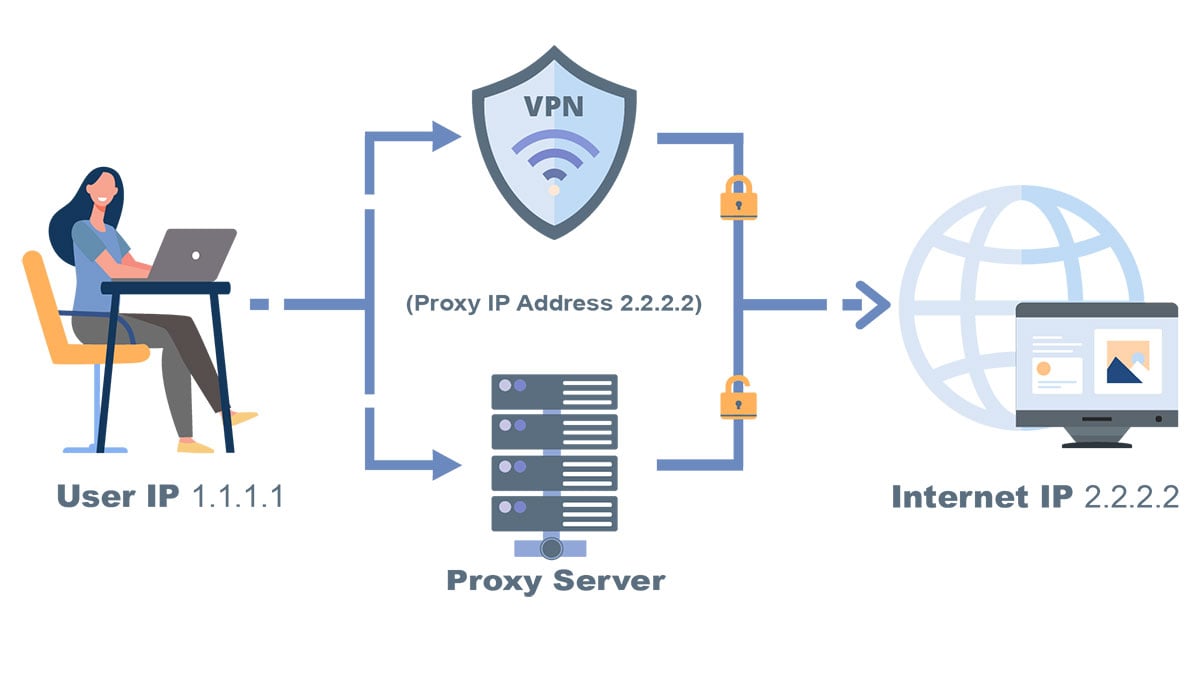
Please Note: Whether an IP address is a proxy server is generally stable, but this status can change over time as networks are reconfigured.
More Articles:
9. What Is the Network Speed of 20.167.168.95?
Common Types of Internet Connections
Internet connection speeds vary widely depending on the technology. Here are the main categories:
- Enterprise/Commercial: High-speed connections for businesses, often using dedicated fiber. Speeds can easily reach gigabit-per-second (Gbps) levels.
- Residential Broadband: This includes Fiber, Cable, and DSL connections for homes. Speeds typically range from dozens to hundreds of megabits-per-second (Mbps), with many fiber plans now offering gigabit speeds.
- Dial-Up: An older technology using telephone lines, with much slower speeds measured in kilobits-per-second (kbps).

Based on our data, the connection type for the IP address 20.167.168.95 is classified as: T1.
More Articles:
10. What Is 20.167.168.95 Used For?
IP Address Usage Types
IP addresses can be classified by their primary purpose. Here are the common usage types we identify:

- (COM) Commercial: Used by businesses and corporate networks.
- (ORG) Organization: Used by non-profit or non-governmental organizations.
- (GOV) Government: Used by government agencies.
- (MIL) Military: Used by military organizations.
- (EDU) Education: Used by educational institutions like schools and universities.
- (LIB) Library: Assigned to public libraries.
- (CDN) Content Delivery Network: Used by CDNs to distribute web content efficiently.
- (ISP) Fixed-line ISP: Internet Service Providers offering broadband (e.g., Cable, DSL, Fiber).
- (MOB) Mobile ISP: Internet Service Providers for cellular networks.
- (DCH) Data Center/Hosting: Used by data centers, web hosting, and cloud providers.
- (SES) Search Engine Spider: Used by web crawlers from search engines.
- (RSV) Reserved: IP addresses set aside for special technical purposes.
Based on our analysis, the IP address 20.167.168.95 is classified as: DCH.
Disclaimer: This classification is determined through automated analysis of network data and is provided for informational purposes only.
More Articles
11. How Can I Find the Administrator of 20.167.168.95?
You can use a WHOIS lookup to find the organization responsible for an IP address, including contact details like the administrator's name and phone number.

For example, a WHOIS lookup for the IP address 20.167.168.95 provides the following key details:
- Administrative Agency: MSFT
- Description:
- Country/Region: AU
- Address: One Microsoft Way Redmond WA 98052 United States
- Administrator: Microsoft Corporation
- Tel: +1-425-707-5601
- E-mail: pracsin@microsoft.com
The WHOIS system was created so that network operators and the public can find the person or organization responsible for a network resource. This is crucial for troubleshooting technical problems (like an ISP needing to report a fault) and for reporting network abuse, such as contacting an administrator to stop spam coming from a specific IP address.
More Articles:


