192.168.88.1 Login Password

Camilla Woo February 28, 2026

Banner

192.168.88.1 is the login address used by some routers and wireless devices to access the admin panel. From here, you can check network status, change Wi-Fi settings, or configure the router. Note that the login password is usually different from your Wi-Fi password.

192.168.88.1 Router Login Username and Password

Here are the default login credentials for common devices:

Device Default Username Default Password Notes
MikroTik RouterOS (most models) admin blank (leave empty) Some newer versions may require setting a password on first login
Some wireless CPE (e.g., Huawei, Xiaomi portable Wi-Fi) admin admin or 1234 Check the label on your device
Portable Wi-Fi devices (e.g., TP-Link mini routers) admin admin It’s recommended to change the password immediately after login

Important: Default passwords only work for devices that have never been modified. If someone has already changed the password, the default credentials will no longer work.

Forgot Login Password? Here Are the Solutions

Method 1: Check the Device Label
Most routers, CPEs, and portable Wi-Fi devices have a label on the back or bottom showing the admin IP, username, and password. This is the most accurate and reliable way to retrieve your login information.
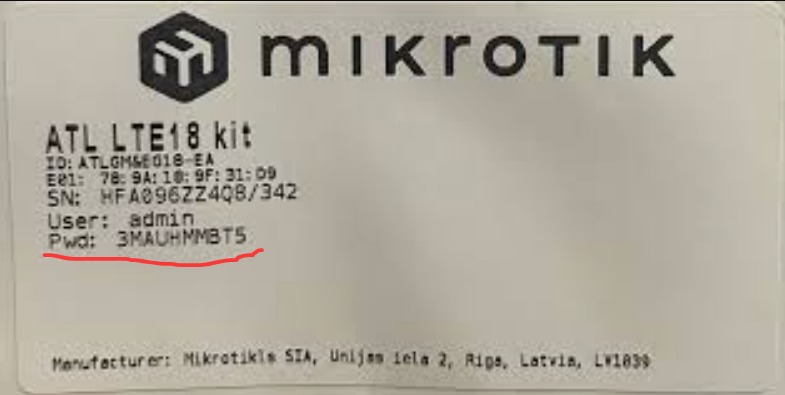
label

Method 2: Restore Factory Settings (Reset Password)
If the label is missing or the password has been changed, you’ll need to reset the device to factory defaults. Follow these steps:

  • Locate the Reset hole/button on the device
  • With the device powered on, press and hold the pin for 5–10 seconds
  • Release when all the indicator lights blink or the device restarts
  • After reset, log in using the default username and password from the table above

⚠️ Note: Factory reset will erase all settings, including internet accounts, Wi-Fi names, and passwords. You will need to reconfigure the network to regain internet access.
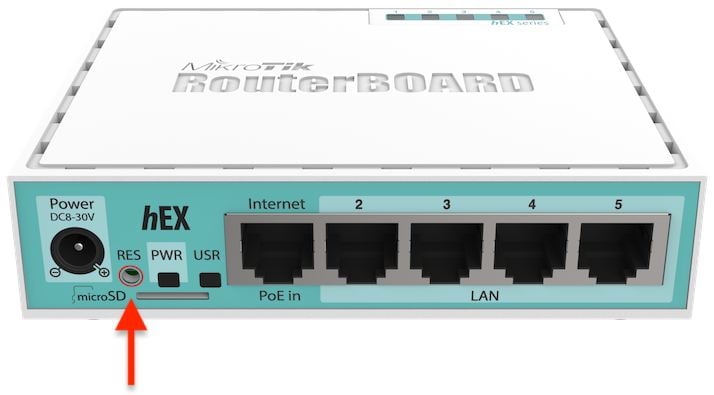
reset

192.168.88.1 Login

  • Connect your phone or computer to the device via Wi-Fi or Ethernet cable.
  • Open a web browser and enter 192.168.88.1 in the address bar.
  • Enter the admin username and password.
  • Once logged in, you can change the Wi-Fi password, view connected devices, and configure network settings. See more detailed guide.

192.168.88.1 Login: Router Admin Panel Access Guide

192.168.88.1 Login: Router Admin Panel Access Guide

192.168.88.1 Login: Router Admin Panel Access Guide 192.168.88.1 is a common login address for certain routers and wireless devices, often used by MikroTik routers (RouterOS), some wireless C

more
192.168.7.1 Login Password & Settings

192.168.7.1 Login Password & Settings

192.168.7.1 Login Password & Settings On many portable routers, mobile hotspots, or IoT devices, you may see 192.168.7.1 used as the default gateway or login address. If you want to m

more
Buffalo AirStation – Admin Login and Passwords

Buffalo AirStation – Admin Login and Passwords

Buffalo AirStation – Admin Login and Passwords Buffalo is a well-known Japanese networking brand, and AirStation is their line of wireless routers. Whether you have a WSR, WXR, or WH

more
192.168.15.1 Admin Login and Password Guide

192.168.15.1 Admin Login and Password Guide

192.168.15.1 Admin Login and Password Guide.168.15.1 is a private IP address used to access a router’s settings interface. Some routers and gateway devices use 192.168.15.1 as their default login addr

more

📚 Comment

Languages