 IP
IP Icon / Image Meaning Table
0.0.0.0 is a reserved IP address reserved by the IP address management agency and not assigned as a public or private IP. The reserved IP is generally used for special purposes, such as software, private networks, hosts, subnets, documents, conversions, multicast, broadcast, local communication, loopback, relay, link, mapping, testing and future usage. Non-professional users are rarely involved.
Content:
1. What is 0.0.0.0?
0.0.0.0 is an IP address, it represents a device on the Internet.
IP address is used to identify the device that sends or receives data in cyberspace and is represented by a string of numbers.
The number can be displayed in binary, decimal, hexadecimal, etc., as shown in the figure below, with decimal being the most common.
 Description of IP Address in Binary, Decimal and Hexadecimal
Description of IP Address Class A/B/C/D/E and Network ID, Host ID
Description of IP Address in Binary, Decimal and Hexadecimal
Description of IP Address Class A/B/C/D/E and Network ID, Host ID
Notice:
A correct IP address has 4 numbers and connected by dot, such as there only 3 numbers in 0.0.0, and 5 numbers in 0.0.0.0.1, they are not correct IP addresses;
The size of the 4 decimal numbers ranges from 0 to 255. If any number exceeds this range, such as 0.0.0.256, it is not a correct IP address.
Sometimes, dot will be replaced by space or hyphen, e.g. 0-0-0-0,0 0 0 0, but generally it is represented by dot, e.g. 0.0.0.0;
If you want to learn more about IP address, please check: What is IP address?
3. Can 0.0.0.0 be used as private IP address of a router?
0.0.0.0 generally cannot be used as a private IP address of a router.
IP addresses can be classified as private IP addresses, public IP addresses and reserved IP addresses.
- Public IP addresses: The overwhelming majority of IP addresses are public addresses and need to apply for registration with the international Internet administrative agency.
- Private IP addresses: 3 IP address segments are reserved in the IPv4 address protocol as private addresses for internal use by the organization.
- Reserved IP Addresses: There are also some reserved addresses, which are used as private IP address space or for special purposes such as internal LAN.
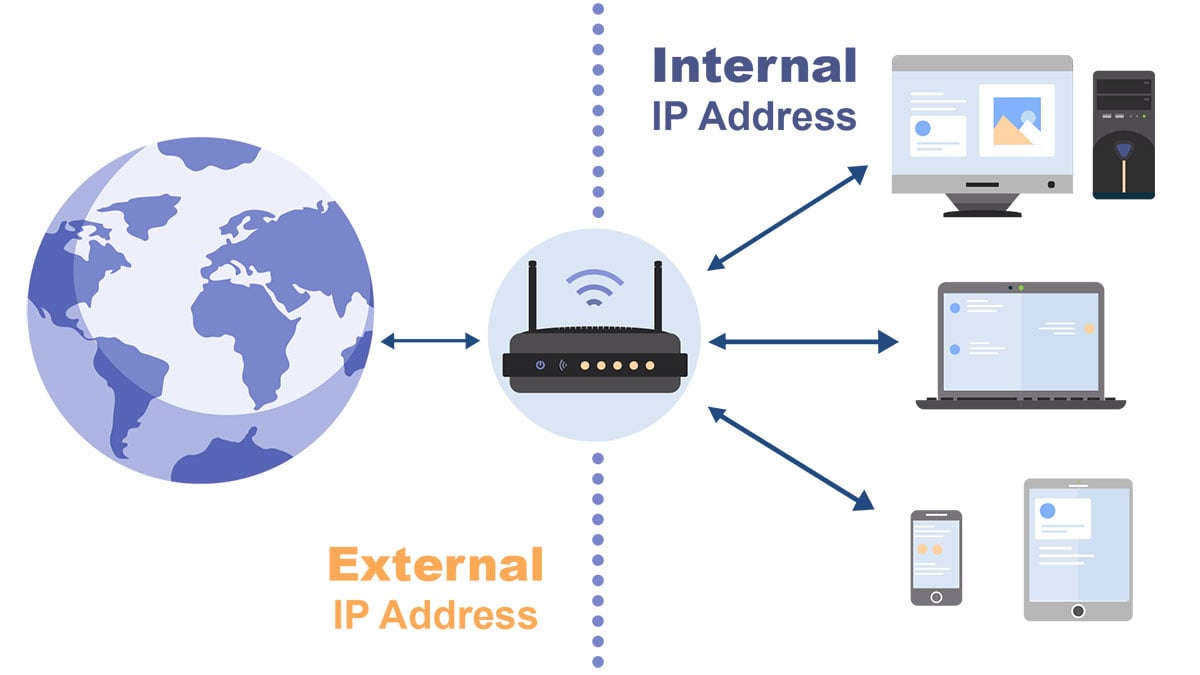
From the screenshot above, you can see the different locations and utilizations of public IP address and private IP address.
From the definition of IANA, the private IP address is also classified as a reserved IP address. There are mainly 3 IP segments:
| Class | Address range | Number of addresses | Number of networks |
|---|---|---|---|
| Class A | 10.0.0.0 ~ 10.255.255.255 | 16777216 | 1 Class A |
| Class B | 172.16.0.0 ~ 172.31.255.255 | 1048576 | 16 Class C |
| Class C | 192.168.0.0 ~ 192.168.255.255 | 65536 | 256 Class C |
Our website judges that the above 3 IP segments are classified as private IP addresses. The IP addresses of these 3 IP segments can be used for routers, and other special IP addresses are classified as reserved IP addresses. Therefore, 0.0.0.0 is not the private IP address used by the router.
Note: If 0.0.0.0 is forcibly used as the router IP address, it may cause IP conflicts and other situations that makes the router cannot be used normally.
5. Can I find out the geographic location of the IP address 0.0.0.0?
Short answer: No. The IP address geographic location of 0.0.0.0 cannot be found.

Three types of IP addresses correspond to:
- Public IP address: Used on the Internet, you can find out where the IP address belongs to, generally accurate to the city level.
- Private IP address: Used in the internal network, there is no corresponding geographic location, and the IP address geolocation cannot be found.
- Reserved IP address: Used for special purpose, there is no corresponding geographic location too, and the IP address geolocation cannot be found.
6. How to find out the administrator of 0.0.0.0?
You can use Whois lookup to find out the administrative agency of an IP address, and even the phone number and other contact information of the administrator.

Using the Whois tool to look up 0.0.0.0 will yield a lot of information, and we pull out the main information as follows:
- Administrative agency: SPECIAL-IPV4-LOCAL-ID-IANA-RESERVED
- Description:The address 0.0.0.0 may only be used as the address of an outgoing packet when a computer is learning which IP address it should use. It is never used as a destination address. Addresses starting with "0." are sometimes used for broadcasts to directly connected devices. If you see addresses starting with a "0." in logs they are probably in use on your network, which might be as small as a computer connected to a home gateway. This block was assigned by the IETF, the organization that develops Internet protocols, in the Standard document, RFC 1122, and is further documented in the Best Current Practice document RFC 6890. IANA is listed as the registrant to make it clear that this network is not assigned to any single organization. These documents can be found at: http://datatracker.ietf.org/doc/rfc1122 http://datatracker.ietf.org/doc/rfc6890
- Country/Region:
- Address: 12025 Waterfront Drive Suite 300 Los Angeles CA 90292 United States
- Administrator:Internet Assigned Numbers Authority
- Tel: +1-310-823-9358
- E-mail: res-ip@iana.org
The Whois lookup tool is designed to allow people to find the responsible agency and administrator when there is network problem. At present, Whois tools are widely used in the network technical level, for example, if Telecom Internet service providers find there is network problem, they can quickly notify the relevant responsible person to diagnose and deal with it. In addition, if there is network resources abuse, such as a lot of spam from a certain IP address, they can also contact the person in charge of spam complaints to deal with it.
More articles:


