 IP
IP
Nowadays, Wi-Fi has become an essential way of connecting to the internet for our home life and daily work. We often encounter multiple connections in a network, such as smartphones, tablets, and computers. Have you ever wondered whether the IP addresses of your phone and computer are the same when they are using the same Wi-Fi for internet access? This article will provide an answer to this question.
Basic Information about IP Addresses
- An IP address is a 32-bit number represented in dotted decimal format (e.g., 192.168.1.1).
- IP addresses are assigned to devices by network administrators.
- IP addresses are used to identify devices on a network and route data to the correct destination.
- IP addresses are an integral part of the Internet infrastructure.

IP Address Allocation in a Wi-Fi Network
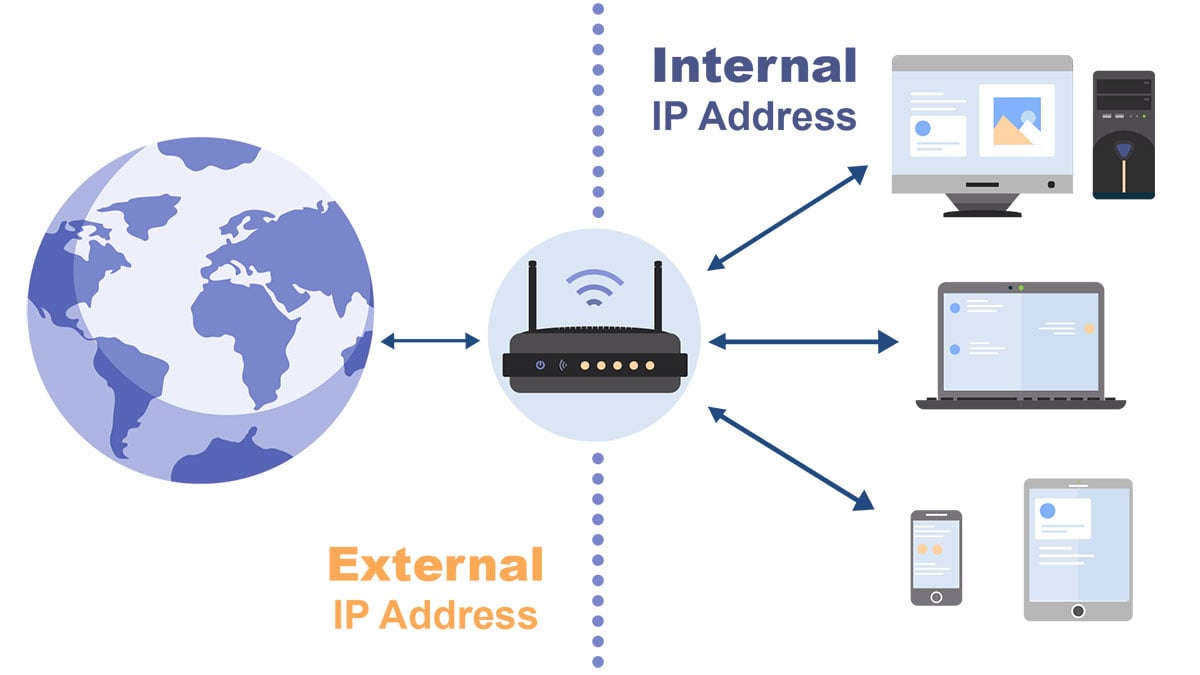
In everyday Wi-Fi networks, routers are typically used to create and manage the network, transmitting internet connectivity to connected devices. When devices connect to the network via Wi-Fi, the router assigns a unique IP address to each device. This process is known as Dynamic Host Configuration Protocol (DHCP). By utilizing DHCP, the router assigns IP addresses to devices that require internet access, providing them with unique private IP addresses for communication within the local network.
Private IP addresses are not routable on the internet and are only intended for use within the local network. They must not overlap with the private IP addresses of other devices, as it would result in IP conflicts and disrupt proper internet connectivity. Common ranges for private IP addresses include:
- 10.0.0.0 ~ 10.255.255.255
- 172.16.0.0 ~ 172.31.255.255
- 192.168.0.0 ~ 192.168.255.255

IP Addresses for Mobile Phones and Computers
As mentioned earlier, in a Wi-Fi network, devices are assigned different private IP addresses. This means that when a mobile phone and a computer are connected to the same Wi-Fi network, their private IP addresses are different. But what about the public IP address?
A public IP address (also known as a extranet IP address) is a unique IP address assigned by the Internet Service Provider (ISP) to the router or gateway. When a device connects to the internet through a router, all outgoing requests from the local network are translated by the router's Network Address Translation (NAT) function, mapping the private IP addresses to the same public IP address. This public IP address is the visible address for the device when communicating over the internet.
Therefore, when a mobile phone and a computer are connected to the same Wi-Fi network, they share the same public IP address. When you search for your public IP address on Baidu or Google, it will display the same IP address for both devices. You can try checking the IP address on both devices to confirm.


How to Connect to Two WiFi Networks at the Same Time and Improve Your Phone's Internet Speed?
How to Connect to Two WiFi Networks at the Same Time and Improve Your Phone's Internet Speed? When you encounter network lag or slow internet speed, don't you want to switch to a faster WiFi signal?
- January 17, 2024
- Popular

What should I do if the WiFi connection is normal but the mobile phone cannot access the Internet?
What should I do if the WiFi connection is normal but the mobile phone cannot access the Internet? If other devices can access the Internet via WiFi, but your mobile phone can’t access the Intern
- June 21, 2021
- Popular


